1. Exclusive software from Kot Engenharia: discover Procal
Procal Kot Engenharia in-house finite element software, conceived and created by Professor Ihor Kotchergenko. Thesoftware allows the creation of models of steel, concrete, and mixed structures.
In practice, Procal mainly used to calculate truss structures, stringers, towers, transfer houses, process buildings, bridges, walkways, and similar structures. As it is a proprietary development tool, it allows Kot to create and use customized modeling, calculation, export, import, verification, and result visualization features. Therefore, the software is optimized to meet the needs of Kot and its customers.
In addition, Kot has a Procal development team that ensures that the program is constantly evolving to adapt to changing standards, customer specifications and market trends. The figure below shows the Procal interface:
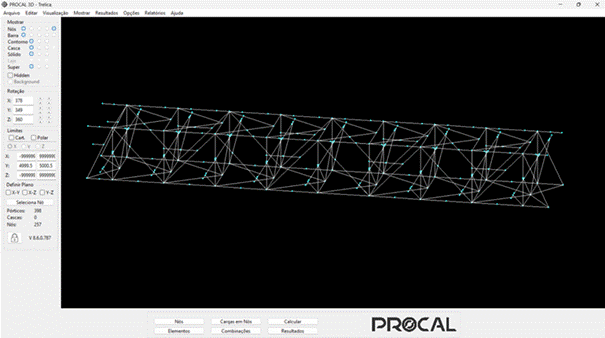
Procal front-end screen.
2. Structural modeling with Procal
In Procal, you can create frame, shell and solid elements, allowing you to model a wide range of engineering problems. In the calculations of the frame elements, the deformations due to axial forces, bending moments in the two main axes, torsion and shear in both axes are obtained.
The application has a library of catalogs with different types of sections, such as "I", "U", "T", angle, HSS, reinforced concrete sections, among others. It is also possible to define profiles with customized dimensions or with a generic section (you only need to define its geometric properties).
The software allows the application of nodal, concentrated, or distributed loads on elements, with linear, triangular, or trapezoidal variations across the entire element or part of it. In addition, it is possible to apply gravitational forces on frame and shell elements and apply pressure on shell elements. Another feature for applying actions is the definition of temperature variation in elements, representing the effects of expansion or contraction of structures.
In addition to loads, Procal allows the definition of elastic bases or defined settlements. In this way, it is possible to account for the influence of supports on the analyzed structure, when applicable. This feature is very useful for representing soil-structure interaction, applicable to foundation structures, buildings and bridges.
3. Compliance with standards
One of Procal 's most recent updates is the automatic calculation of wind in structures according to the ABNT NBR 6123 standard of 2023. The basic wind speed, together with the standard factors, are taken into account to determine the pressure for each elevation of the calculation model. Using the appropriate pressure and shape coefficients for the structure, the program allows for an accurate calculation of wind actions. In Procal, it is also possible to automatically take into account the protection factor for parallel plane lattices, in accordance with NBR 6123. The figure below shows one of the automatic wind application screens:
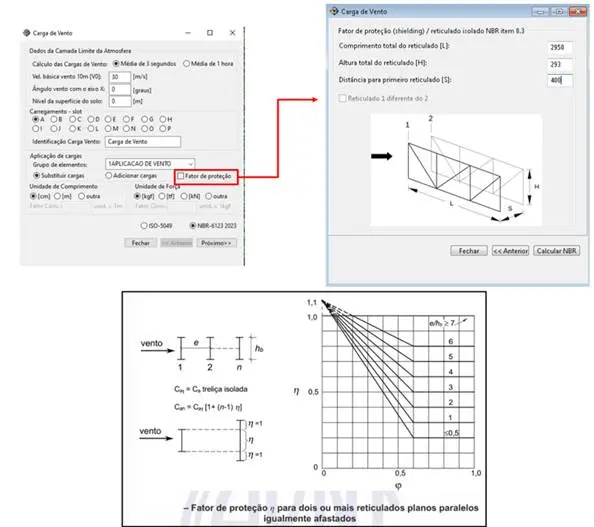
Shielding effect for wind application in structures in accordance with NBR-6123.
Once the model is calculated and the stresses on the elements are determined, Procal the frame elements, with steel sections, to be checked normatively according to AISC 360 using the ASD and LRFD design methods. Thus, each section is evaluated by comparing the acting stresses with the strength of the structural element, generating the results of the utilization indices. It is possible to generate color-scale images showing the level of utilization of each element, as shown in the example below.
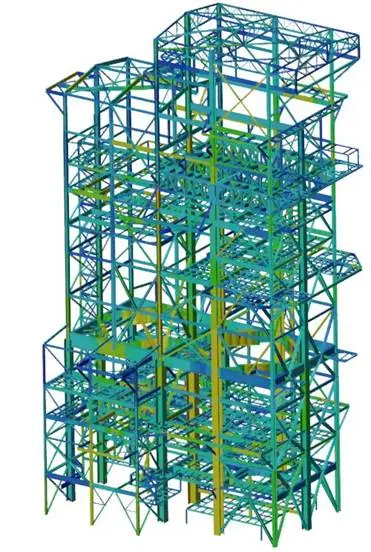
Utilization rates of frame elements - steel structure building.
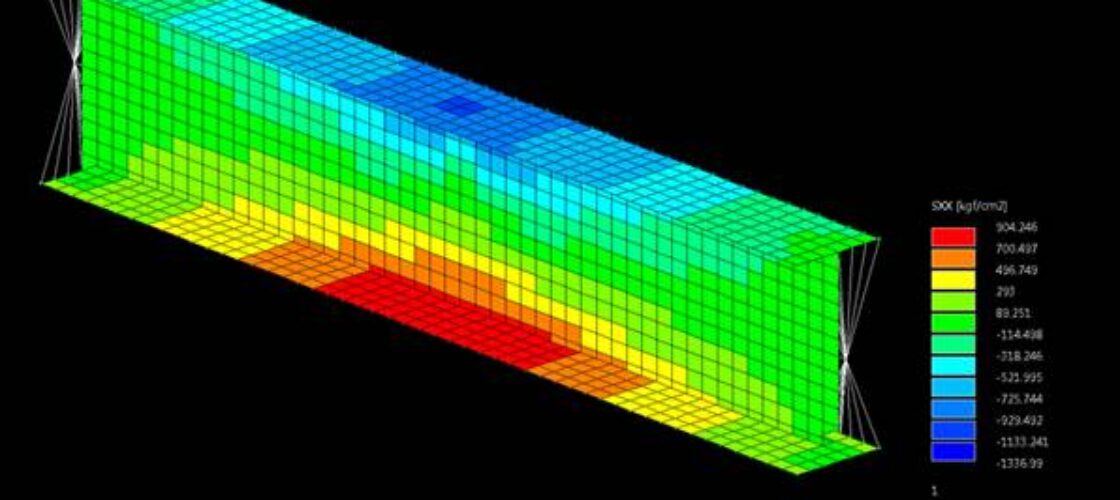
In addition to the stress level of the elements, it is possible to view the displacements of the structure (in color scale or deformed structure), stress diagrams and stresses in shell elements. The following figures show some of the results:
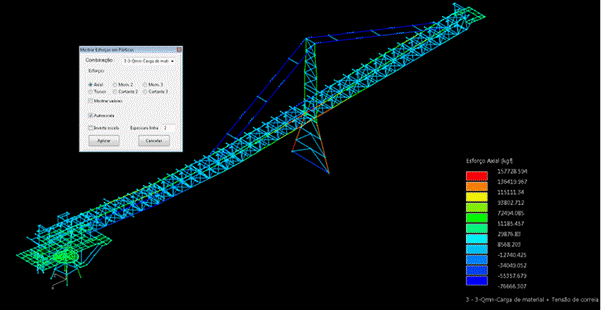
Visualization of stresses in cross-linked elements.
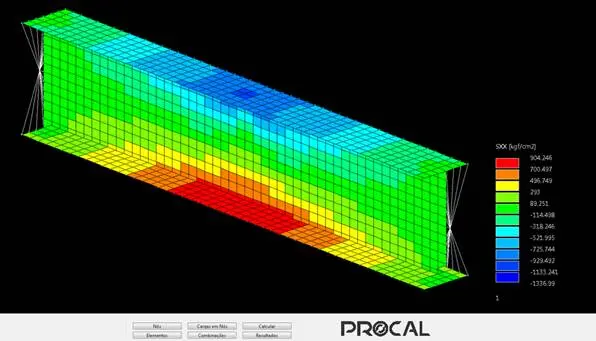
Visualization of stresses in shell elements.
Procal integrations Procal engineering and BIM modeling software
Procal also has import and export interfaces with different software and tools. Some examples are: FEMAP, ANSYS, SolidWorks, BIM via IFC files, VRML (virtual reality markup language), as well as internal tools and spreadsheets. The following figure shows a model created in Procal and exported to FEMAP.
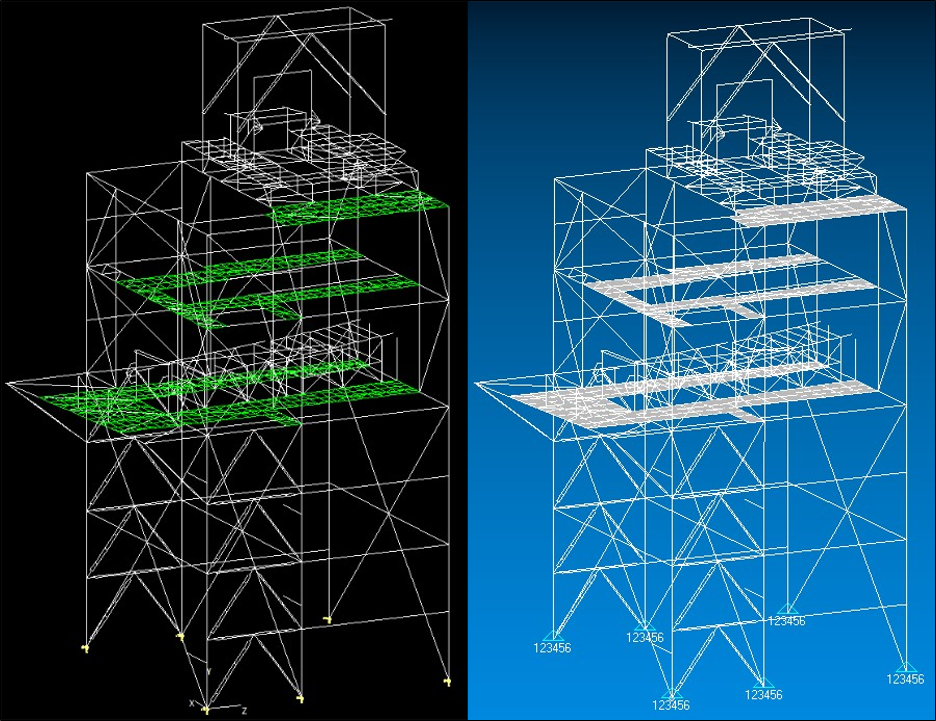
Transfer house model in Procal (left) and FEMAP (right).
Conclusion: Performance, customization, and compliance in structural simulations
Finally, it should be noted that Procal a powerful tool. Developed by Kot, the tool has undergone constant evolution over the years to ensure that analyses are performed more efficiently and in accordance with the latest standards. Its features allow analyses to be performed in a more agile, assertive, and targeted manner for its customers' applications.
Technology and innovation is with Kot Engenharia
If you, like our more than 150 clients, are looking for specialized solutions in structural analysis or failure prevention such as deformation, vibration, and corrosion, consult our team and count on Kot Engenharia.
Since 1993, we have been offering engineering consultancy services through technical studies using non-destructive testing, field instrumentation and computer simulations (FEM, DEM and CFD) for highly complex diagnoses of concrete and metal structures and industrial equipment.
Follow our pages on LinkedIn, Facebook e Instagram and keep following our content.
FAQ
1. What is Procal what are its main advantages over commercial finite element software?
Procal a finite element structural analysis tool developed exclusively in-house by Kot Engenharia, designed by Professor Ihor Kotchergenko. The key advantage of having proprietary software is the freedom to customize it: Kot has a dedicated development team that constantly updates the program, allowing the creation of specific modeling features, the import and export of customized data, and the immediate adaptation of the code to new market trends, changes in technical standards, or the specific requirements of each client.
2. What types of structural elements, cross-sections, and loads can be simulated on the platform?
The software allows for the complete modeling of engineering problems using truss (lattice), shell, and solid elements. For truss elements, the system calculates deformations due to axial forces, bending moments on the two principal axes, torsion, and shear, utilizing a comprehensive library of cross-sections (I, U, T, angle sections, HSS, and reinforced concrete sections). In terms of loads, Procal nodal forces, concentrated or distributed forces (linear, triangular, and trapezoidal), gravitational forces, pressure on shells, and thermal variations to simulate expansion or contraction effects.
3. How Procal wind loads, and on which technical standard is it based?
The software features a fully parameterized automatic wind calculation routine in accordance with the ABNT NBR 6123 standard. The engineer enters the basic wind speed, and the program cross-references this data with the standard factors to determine the exact pressure at each elevation of the model. An advanced feature of Procal its ability to automatically account for the shielding effect (protection factor for parallel flat trusses), which ensures highly accurate and reliable aerodynamic modeling for complex industrial structures.
4. How does the software assist in the regulatory verification of steel structures and in decision-making?
After solving the numerical model and determining the applied forces, Procal automatically Procal the steel-section truss members based on the international standard AISC 360. The tool supports the two main design methods on the market: ASD (Allowable Stress Design) and LRFD (Load and Resistance Factor Design). Finally, the program generates color-coded graphs that show the utilization ratio of each member, allowing users to visually identify—in a matter of seconds—which points are overdesigned or operating near the failure limit.
5. Procal compatible with other modeling tools and with the BIM methodology?
Yes. To ensure an integrated and agile workflow, Procal communication interfaces with leading industrial CAD/CAE software, allowing it to export and import data directly to platforms such as FEMAP, ANSYS, and SolidWorks. In addition, the program is aligned with the digital transformation of Civil Engineering supporting the BIM (Building Information Modeling) concept through the import and export of files in IFC format, as well as files in VRML format and internal automated spreadsheets.